
Crossplay solves one particular problem: friends with different systems want to play together. It does not automatically transfer purchases, combine every edition or make every mode compatible. The best crossplay games therefore need both an enjoyable shared activity and a clearly supported route into the same session. Our shortlist includes competition, casual matches and a dedicated cooperative adventure. The compatibility statements below are grounded in current publisher guidance checked on 6 November 2026. Still verify your exact platform pair before buying, because an expanding platform list does not guarantee identical features everywhere.
Editorial illustration, not a game screenshot.
Which game should you choose?
- Split Fiction: Choose it for an adventure designed around two people contributing throughout. EA’s guide confirms crossplay and Friend’s Pass support across PC, PlayStation 5 and Xbox Series X|S. Do not extend that specific compatibility statement to another edition without checking its guidance. Console online subscription requirements still apply, and one player must own the full game for full Friend’s Pass access.
- Rocket League: Choose it for a sporting objective everybody can understand, with enough mechanical depth to support a regular duo or team. Epic confirms cross-platform online play across Epic Games Store, Steam, PlayStation, Xbox and Nintendo Switch. Steam participation does not mean a new Steam purchase is available. Cross-platform settings, account links and communication features should be checked separately.
- Fortnite: Choose it for friends who want several possible activities within one ecosystem. Epic’s friends guidance supports cross-platform play, while Zero Build changes the starting skill emphasis from construction-heavy battle royale. Check the exact mode, party size and parental permissions. Different experiences can have different arrangements, and crossplay does not make every item of virtual currency universally transferable.
- Brawlhalla: Choose it for platform fighting without an upfront game purchase. Its official Steam listing confirms cross-platform play across PlayStation, Xbox, Nintendo Switch, iOS, Android and Steam. A free download does not remove the learning curve or optional purchases. Agree on casual rules before matching a newcomer against a highly practised friend.
| Game | Best fit | Main consideration |
|---|---|---|
| Split Fiction | Two-player online campaign | Check exact edition and subscriptions |
| Rocket League | Cross-platform team sport | Accounts and communication |
| Fortnite | Varied shared activities | Mode and account permissions |
| Brawlhalla | Accessible platform fighting | Skill gaps and purchases |
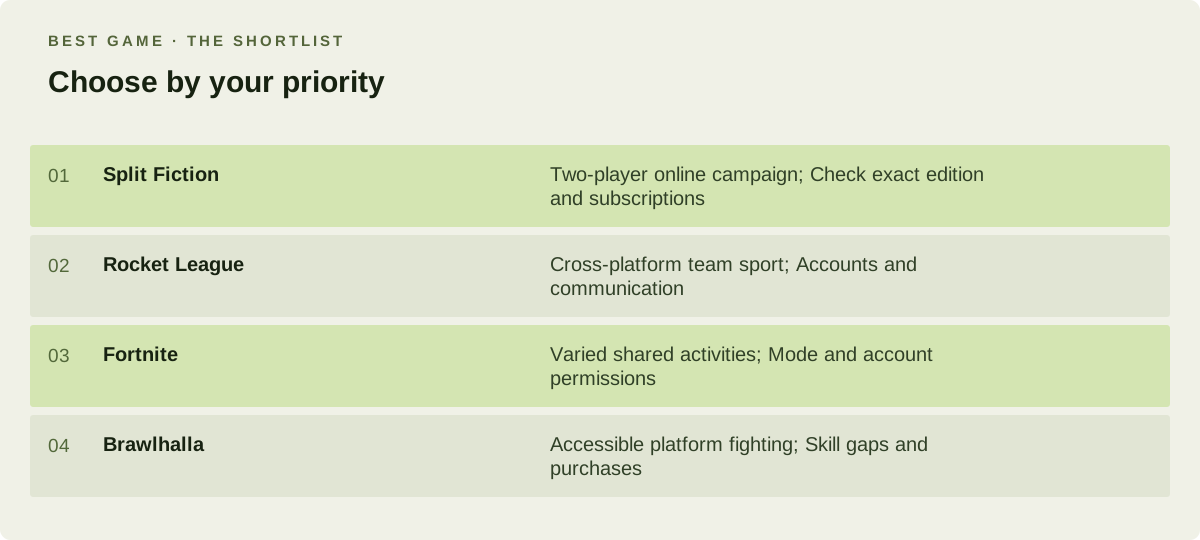
Choose by your priority. Comparison by play preference, not a numerical score.
What matters before you start?
Check three things independently: can the games connect, do your saves follow you, and what do you need to buy? Crossplay answers only the first question. Cross-progression and shared purchases may have account-linking conditions or exclusions. Use official invite instructions rather than relying on a console friend list alone. Install updates before the session, confirm crossplay settings on both devices and test a private lobby. A ten-minute setup check is especially useful when one friend is joining through a pass or a different storefront.
Make the choice fit your routine
Choose Split Fiction for a scheduled partnership, Rocket League for repeated sporting matches, Fortnite for variety or Brawlhalla for direct fighting. Co-op games serve friends who prefer a shared outcome; multiplayer games cover a wider range of competitive arrangements. If you are buying specifically for one friend, their exact system is the decisive compatibility check. Do not buy first and assume a familiar crossplay label covers it. Keep account ownership clear too: avoid making an irreversible account-linking choice merely to rush into a session, particularly when existing saves or purchases are involved.